The Watercolor Frame Floral: A Digital Asset for Practical Creative Workflows
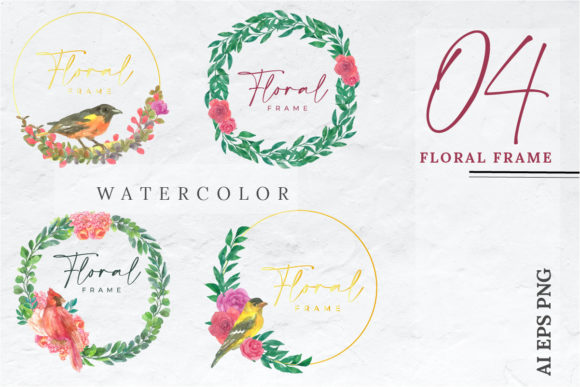
In a creative workflow, efficiency often comes from the quality and flexibility of your foundational assets. The Watercolor Frame Floral represents a specific solution for designers, entrepreneurs, and creators looking to incorporate organic, artistic elegance into their projects without starting from zero each time. It is a set of digital graphic elements derived from an original manual hand-drawn watercolor piece. The artist’s original touch—the subtle blends, the delicate strokes, the spontaneous flow of color—has been meticulously processed and translated into a versatile digital format. This transformation is the core of its value: it bridges the tactile warmth of traditional art with the demands and possibilities of modern digital design.
Where the Watercolor Frame Floral Fits in Your Process
Whether you are designing a boutique wedding invitation, crafting a thank-you card for a client, developing a line of stickers, or creating promotional materials for a small business, the initial stage often involves sourcing or creating a central visual motif. This asset sets the tone and aesthetic foundation. The Watercolor Frame Floral is designed to slot into this phase of your workflow as a ready-made, yet customizable, core element. Instead of spending hours sketching, painting, scanning, and digitizing a floral frame yourself, you begin with a high-quality, artist-made base. This shift allows you to allocate your time and energy to the application, customization, and overall composition of your project, significantly streamlining the early creative stages.
Integration with Professional Tools and Platforms
The practical utility of the Watercolor Frame Floral is largely defined by its technical preparation. The inclusion of an AI file and an EPS file means it is fully accessible within professional vector-based editing environments like Adobe Illustrator or Affinity Designer. These formats are not simply flat images; they contain the underlying vector data or structured paths, allowing for fundamental modifications without loss of quality. You can change colors, adjust stroke widths, rearrange individual elements, or scale the entire design infinitely for large-format printing or tiny web icons.
Furthermore, the provision of nine PNG files at 4000x4000px resolution addresses a different set of workflow needs. PNGs with transparent backgrounds are immediately usable in raster-based software such as Photoshop, Canva, Procreate, or even standard office and publishing applications. They are perfect for quick placement, for users who prefer a non-vector workflow, or for situations where the design needs to be used as a static layer. The separation of all elements into small, grouped components, as noted in the accessible AI and EPS files, is a critical feature for advanced customization. It means you can isolate a single leaf cluster, a blossom, or a section of the frame border to use independently, repurpose, or modify without affecting the rest of the artwork.
Practical Implementation and Use Cases
Consider a freelance graphic designer working on a suite of materials for a botanical-themed café. They might open the EPS file in Illustrator, extract a few key floral clusters to create a custom logo lockup, use the full frame for the café’s menu cover, and employ isolated leaves as decorative elements on social media templates created in Canva using the PNGs. The same asset drives consistency across the entire brand identity project.
For a small business owner creating DIY invitation designs for a workshop, the PNG files offer a straightforward process. They can drag and drop the watercolor frame into their chosen invitation card template in a simple design tool, overlay text, and quickly produce a professional-looking result that feels personal and artistic. The hand-drawn origin lend a credibility and warmth that purely digitally-generated art often lacks.
Educators or content creators might use the separated elements to design engaging worksheet borders, webinar presentation slides, or printable stickers for classroom rewards. The separation into groups allows for easy adaptation to different themes or topics by selectively using relevant floral parts.
Factors for Efficient Long-Term Use
To integrate the Watercolor Frame Floral smoothly into a long-term creative routine, organization is key. Upon acquiring the files, a practical first step is to audit them: open the AI file to understand the group structure, save a version in your project’s master asset library, and perhaps create a quick-reference sheet showing the isolated PNG elements. This preparation prevents time lost searching for the right file later.
Compatibility is inherently high due to the standard formats provided, but ensuring your software versions can support these files is a basic check. For teams, establishing a brief guideline on how the asset should be used—such as color palette restrictions to maintain consistency, or rules on minimal element distortion—acts as a simple form of quality control.
The asset’s efficiency is realized when it becomes a reusable component in your toolkit. Instead of being a one-off purchase for a single project, its true value grows when it is repurposed across multiple campaigns, product lines, or personal projects over months or years. The high resolution (4000x4000px) guarantees it will not become obsolete for larger print needs, safeguarding its long-term utility.
Enhancing Outcomes Through Artistic Authenticity
Beyond the practical workflow benefits, the Watercolor Frame Floral impacts the perceived outcome of your projects. In a market saturated with clean, geometric digital art, the subtle imperfections and original touch of a real watercolor stroke can make your design stand out. It communicates care, craftsmanship, and a human touch. This can be particularly effective for brands or individuals whose ethos is rooted in sustainability, artistry, wellness, or personalized service. The asset allows you to inject that aesthetic into your workflow at a production pace, a combination that is often difficult to achieve.
Its application before, during, or after a project’s conceptual phase is flexible. You might start with it as a core inspiration (before), adapting your color scheme to match its palette. You could introduce it during layout creation as the defining decorative element. Or, you might use it after the main content is built, as a finishing layer to add elegance and cohesion. This adaptability makes it a reliable asset for both planned and iterative design processes.
Ultimately, the Watercolor Frame Floral is more than just a set of files; it is a workflow intermediary. It takes the output of a specialized artistic process—manual watercolor illustration—and packages it into inputs for a wide range of common digital design tasks. By understanding its structure (the separated groups) and its formats (vector and raster), you can control how deeply you interact with it: from simple placement to deep customization. This empowers you to balance originality with efficiency, a constant pursuit in professional and personal creative work.